Waveform JSON Round-Trip
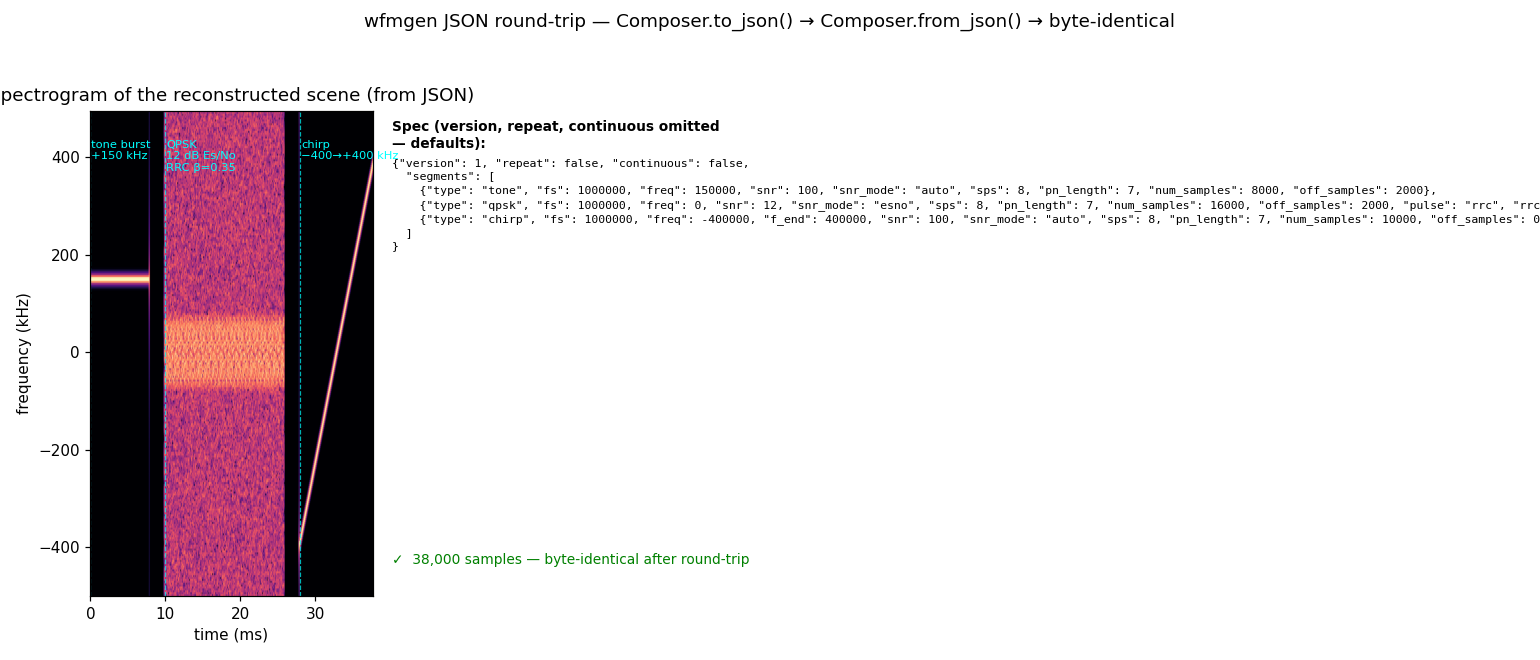
A waveform scene is portable: once serialised to JSON it can be archived,
shared, and reproduced on any platform that has wfmgen or the Python API —
with byte-identical output guaranteed.
What you're seeing
Left — spectrogram of the reconstructed scene. Three segments play in order: a clean tone burst at +150 kHz (tight ridge), a QPSK burst with RRC shaping at 12 dB Es/No (noise haze spread across the band), and a linear chirp sweeping −400 → +400 kHz. The scene was loaded from the JSON spec shown on the right — not from the original Python objects.
Right — the JSON spec. Boilerplate fields (seed, pn_poly, lfsr)
are omitted from the display for readability; the full spec carries them.
version, repeat, and continuous are at the top level; everything else
lives inside segments, one object per segment.
The round-trip
import numpy as np
from matplotlib.offsetbox import AnchoredOffsetbox, HPacker, TextArea, VPacker

from doppler.wfm import Composer, Segment

# Three self-contained segments at 1 MHz: a tone burst, a QPSK burst,
# and a chirp sweep — each carries its own timing in the JSON spec.
FS = 1e6
tone_seg = Segment(
    "tone",
    fs=FS,
    freq=1.5e5,  # +150 kHz carrier
    snr=100.0,  # clean (no injected noise)
    num_samples=8_000,
    off_samples=2_000,
)
qpsk_seg = Segment(
    "qpsk",
    fs=FS,
    snr=12.0,
    snr_mode="esno",  # 12 dB Es/No
    sps=8,
    pulse="rrc",
    rrc_beta=0.35,
    rrc_span=8,
    num_samples=16_000,
    off_samples=2_000,
)
chirp_seg = Segment(
    "chirp",
    fs=FS,
    freq=-4.0e5,  # sweep −400 kHz → +400 kHz
    f_end=4.0e5,
    snr=100.0,
    num_samples=10_000,
)

composer_a = Composer([tone_seg, qpsk_seg, chirp_seg])
iq_a = np.asarray(composer_a.compose(), dtype=np.complex64)

spec_json = composer_a.to_json()  # → JSON string (same as --record)

composer_b = Composer.from_json(spec_json)  # → same as --from-file
iq_b = np.asarray(composer_b.compose(), dtype=np.complex64)

assert np.array_equal(iq_a, iq_b), "round-trip produced different samples"
to_json() writes the fully-resolved spec — every default filled in, every
derived value explicit. from_json() (or from_file() for a path on disk)
parses it back and builds an identical composer. Because the spec drives the
same C engine in both directions, the round-trip is exact to the last bit.
Using it from the CLI
Save the JSON to a file and feed it straight to wfmgen:
# From Python: write the spec
python - <<'EOF'
from doppler.wfm import Composer, Segment
c = Composer([
    Segment("tone",  fs=1e6, freq=1.5e5, snr=100.0, num_samples=8000,  off_samples=2000),
    Segment("qpsk",  fs=1e6, snr=12.0,   snr_mode="esno", sps=8,
            pulse="rrc", rrc_beta=0.35, rrc_span=8, num_samples=16000, off_samples=2000),
    Segment("chirp", fs=1e6, freq=-4e5,   f_end=4e5, num_samples=10000),
])
open("scene.json", "w").write(c.to_json())
EOF

# From CLI: replay it
wfmgen --from-file scene.json --output scene.cf32
wfmgen --from-file scene.json --sample-type ci16 --output scene.ci16
Or skip Python entirely — wfmgen json-template dumps an editable starter
spec, and every wfmgen run can be recorded with --record:
wfmgen json-template scene.json          # editable skeleton
wfmgen --from-file scene.json \
       --record run.json -o out.cf32     # record the resolved run
wfmgen --from-file run.json  -o b.cf32  # byte-identical replay
The JSON schema is at docs/schema/wfmgen.schema.json; the test suite in
src/doppler/wfm/tests/test_schema.py validates every --record output
against it automatically.
A sequence carried as numbers, not as an array
A preamble, spreading code or sync word can be generated rather than
listed. The record then carries the generator's parameters under a _gen
key beside the literal one it replaces — a field is one or the other, never
both:
"sync_gen": {
  "kind": "pn", "len": 1023, "reg_bits": 10,
  "poly": "0x409", "seed": "0x1", "lfsr": 0
}
That is the difference between a record and a recording: a million-symbol
sync word is six numbers here, so the capture is reproducible from its
metadata. kind is pn, gold or dotted — literal is deliberately not
spellable, because a literal field is already recorded as its own 0/1
string and a second spelling is how two of them start disagreeing.
The masks are hex strings. They are uint64, a JSON number is a double,
and wfm_seq_t allows a register width of 64 — so a number would quietly
lose the top of the range this field exists for.
Reproduce
See also
- Guide: Scenes → Reproducible runs (
--record) — the full--record/--from-filereference this demo is built on.