Waveform I/O — One Capture, Four File Types¶
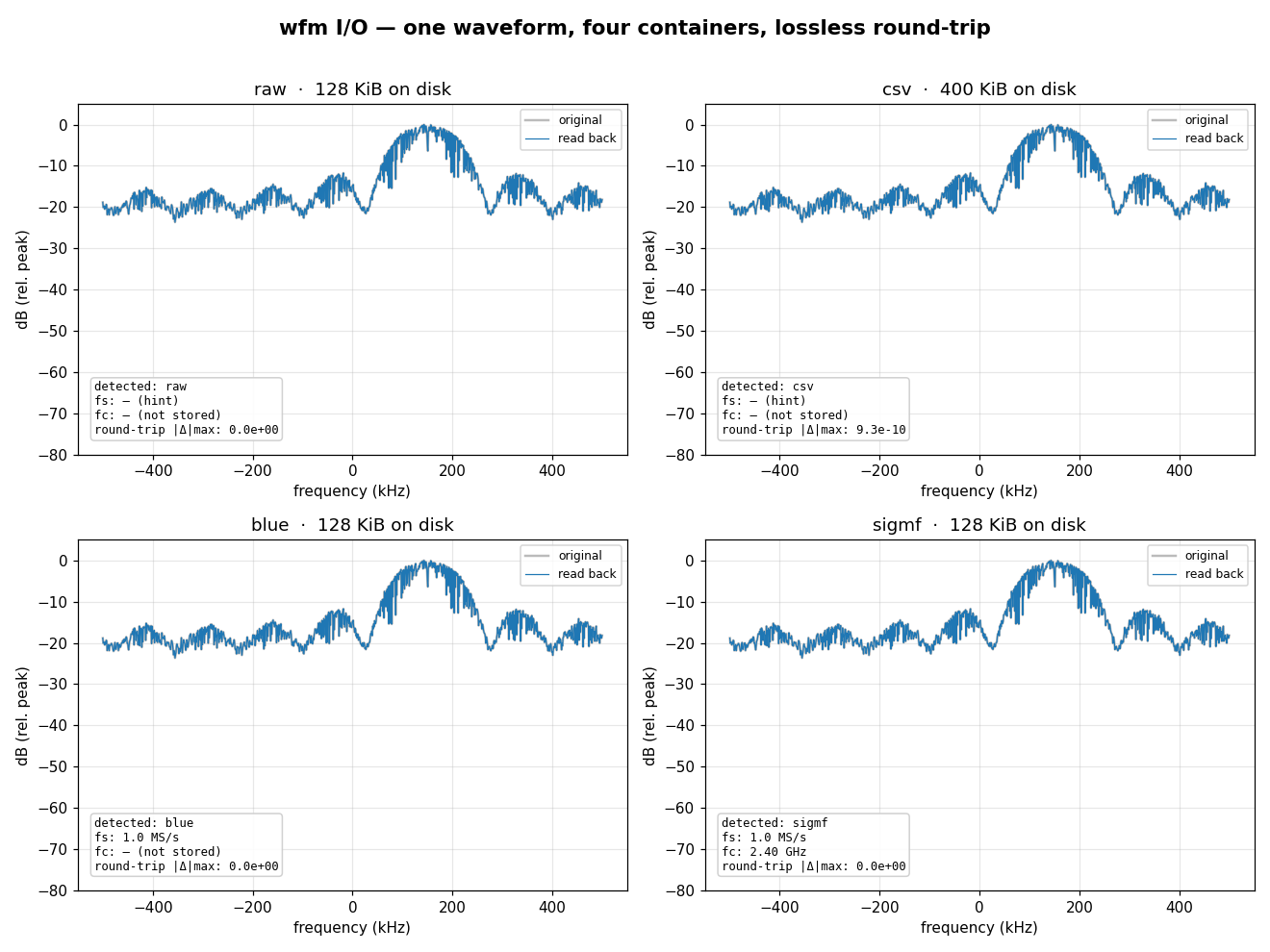
A waveform has to land somewhere. doppler.wfm writes the same complex64
samples to four file types and reads each back — the same C codec behind the
wfmgen CLI's --file-type. The trade is metadata for size and simplicity.
What you're seeing¶
The same QPSK capture written to raw, CSV, BLUE type-1000, and
SigMF, then read back; each panel overlays the round-tripped spectrum on the
original (they coincide — the codec is lossless for cf32) and annotates the
on-disk size and the metadata the file type recovered:
- raw — bare interleaved I/Q. Smallest and fastest, and the container holds
no metadata at all; what it gets instead is a
<path>.sigmf-metasidecar, written beside it and read back automatically, carrying the sample type,fsandfc. So a doppler round trip needs no hint. The sidecar is a second file, though: copy the capture without it and you are back to bare bytes, read ascf32with no rate. - CSV — human-readable
I,Qtext. Self-describing shape, the same sidecar for its metadata, ~3× the bytes (and a tiny text-rounding error). - BLUE (type-1000) — a 512-byte header recording the sample format, byte
order, and
fs(asxdelta = 1/fs); the reader recovers them with no hints. Theformatfield is a[mode][type]pair: doppler writesC(complex, interleaved I/Q) and reads back bothCandS(scalar/real —r.modesays which, and anScapture comes back withimag == 0). Every other Midas mode (V/Q/M/T/…, three or more components per sample) is refused at open rather than walked at the wrong stride and returned as garbage. - SigMF — a
.sigmf-data+.sigmf-metaJSON pair; the most self-describing, recovering bothfsandfc(and one annotation per segment).
Reader auto-detects the file type (BLUE magic / .sigmf-meta sidecar / .csv
extension / else raw). Pass sample_type= only to override what a capture says
about itself — for raw bytes that arrived without their sidecar, or from a tool
that never wrote one.
Building it¶
from doppler.wfm import Composer, Reader, Segment, Writer

seg = Segment("qpsk", fs=1e6, freq=1.5e5, snr=20, sps=8, num_samples=1 << 14)
comp = Composer([seg])
x = comp.compose()

# BLUE: one self-describing file — fs/fc tagged on write, recovered on read.
with Writer("cap.blue", file_type="blue", sample_type="cf32", fs=1e6, fc=2.4e9) as w:
    w.write(x)
with Reader("cap.blue") as r:                 # file type auto-detected
    y, fs = r.read(r.num_samples), r.fs        # fs recovered from the header

# SigMF is a pair: Writer lays down .sigmf-data; Composer.to_sigmf() the sidecar.
with Writer("cap.sigmf-data", file_type="sigmf", sample_type="cf32", fs=1e6, fc=2.4e9) as w:
    w.write(x)
open("cap.sigmf-meta", "w").write(
    comp.to_sigmf(sample_type="cf32", fs=1e6, fc=2.4e9)
)
The CLI writes the same file types — wfmgen --file-type raw|csv|blue|sigmf —
byte-for-byte identical to the Python Writer.
BLUE detached (.hdr + .det)¶
BLUE can split the self-describing header from the samples — a 512-byte
.hdr Header Control Block plus a raw .det body — for pipelines that stream
the payload separately. write_blue_header lays down a standalone detached
header; pair it with a raw Writer for the body:
from doppler.wfm import Composer, Segment, Writer, write_blue_header

x = Composer([Segment("qpsk", sps=8, num_samples=1 << 14)]).compose()

# Header carries BLUE magic, byte order, data_size, type-1000 tag, xdelta=1/fs.
# fs is required here for the same reason it is on Writer: it IS the header.
write_blue_header("cap.hdr", 1e6, sample_type="cf32", fc=2.4e9,
                  total=len(x), detached=True)
with Writer("cap.det", fs=1e6, file_type="raw", sample_type="cf32") as w:
    w.write(x)                       # raw interleaved I/Q body
The CLI does the same in one shot with --file-type blue --detached -o cap
(writes cap.hdr + cap.det); detached output needs --output and a finite
(non---continuous) run.
Read it back through the header, not the body. The HCB's detached field
is what says where the samples live, so Reader follows it to the collocated
.det — the extension never decides. Per BLUE §3.1.1.4 the header is
conventionally <base>.tmp or <base>.prm (doppler writes <base>.hdr), and
all of them work, as does handing Reader the .det directly:
with Reader("cap.hdr") as r:          # the header, not cap.det
    assert r.file_type == "blue"
    assert r.num_samples == len(x)    # from the HCB's data_size
    y = r.read(len(x))                # ...but the samples come from cap.det

assert (y == x).all()
Real-time streaming (SampleClock + StreamSink)¶
For a live feed, pace a Composer.stream against wall-clock with a
SampleClock and publish each block over NATS with a StreamSink. A
doppler.stream Subscriber receives the frames with their fs/fc header.
Requires a nats-server reachable at the endpoint (plain nats-server is
enough for this PUB/SUB feed):
from doppler.stream import Subscriber
from doppler.wfm import Composer, SampleClock, Segment, StreamSink, qpsk, tone

scene = Segment.sum(qpsk(sps=8, snr=20, snr_mode="esno"),
                    tone(freq=1.2e5, level=-12), num_samples=80_000)
sink = StreamSink("nats://127.0.0.1:4222/feed", sample_type="cf64")   # see note below
sub = Subscriber("nats://127.0.0.1:4222/feed")
clock = SampleClock(fs=500_000)
for block in Composer([scene]).stream(block=4096):
    sink.send(block, 500_000, 2.4e9)
    clock.pace(len(block))                 # throttle to fs
    samples, hdr = sub.recv(timeout_ms=50)
print(clock.samples, clock.underruns, clock.max_lateness)
Every wire type decodes on both faces
A doppler.stream subscriber decodes each type StreamSink can emit —
cf32 (the default), cf64, ci8, ci16, ci32 — the same set a C
dp_sub_* subscriber reads. The note that stood here described a
Python-side decode gap that had already been closed.
Reproduce¶
python src/doppler/examples/wfm_io_demo.py          # the four-file type figure (.png)
python src/doppler/examples/wfm_realtime_stream.py  # paced NATS publish + recv stats
See the Python composer API
for the full Writer / Reader surface.
See also¶
- Guide: Output & file types — the flag/parameter reference for the four file types shown here.
- Guide: Streaming — real-time pacing for the NATS sink used above.