Waveform Write — Compose, Write, Read Back
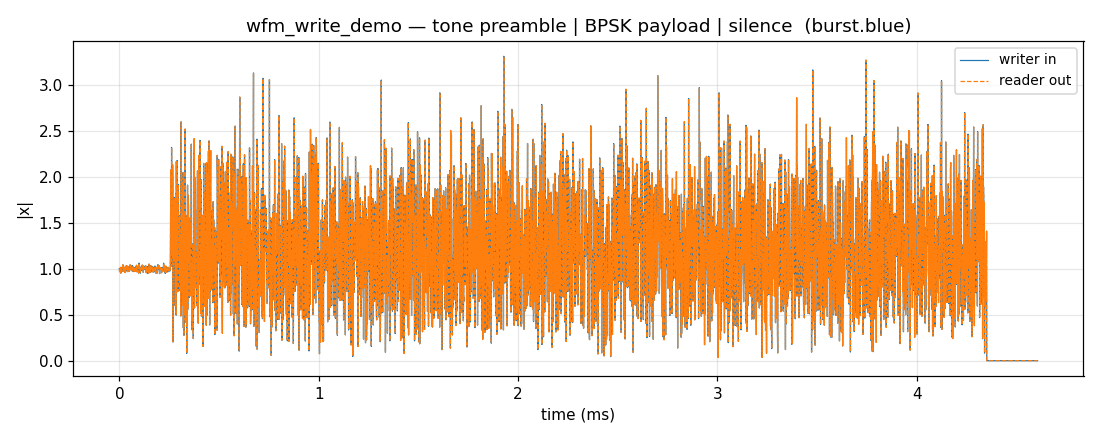
The shortest path from a Composer to a file: build a burst, hand it to
Writer, recover it with Reader, and compare the envelopes.
What you're seeing
Time-domain magnitude of a three-phase burst written to a BLUE type-1000 file and read back:
- Tone preamble — 256 samples, flat envelope, 100 kHz offset, 30 dB SNR.
- BPSK payload — 512 symbols at 8 samples/symbol, 10 dB SNR. The envelope fluctuates with the AWGN noise floor.
- Silence — 256 zero-padded samples; the envelope drops to the noise floor.
The two traces land exactly on top of each other — cf32 round-trips through
BLUE without loss. BLUE's 512-byte header stores the sample type, byte order,
fs, and fc, so Reader needs no side-channel hints.
Building it
from doppler.wfm import Composer, Reader, Segment, Writer

segments = [
    # 256-sample tone preamble at 100 kHz offset, at 1 MS/s
    Segment(type="tone", freq=100e3, sps=1, fs=1e6, snr=30.0, num_samples=256),
    # BPSK payload at 8 samples/symbol, 10 dB SNR, 512 symbols + silence
    Segment(
        type="bpsk",
        sps=8,
        fs=1e6,
        snr=10.0,
        num_samples=512 * 8,
        off_samples=256,
    ),
]

burst = Composer(segments).compose()

with Writer("burst.blue", file_type="blue", fs=1e6, fc=915e6) as w:
    w.write(burst)

with Reader("burst.blue") as r:
    readback = r.read(len(burst))
    fs_rec = r.fs  # sample rate recovered from the 512-byte BLUE header
Reproduce
For four file types side by side — raw, CSV, BLUE, and SigMF — see
Waveform I/O. For the flag/parameter reference behind Writer
and Reader, see Guide: Output & file types.